Breadboard
What is a breadboard?
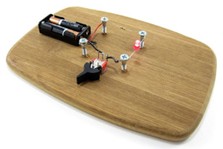
A breadboard is a rectangular plastic board with tiny holes in it. These holes let you easily insert electronic components to prototype (meaning to build and test an early version of) an electronic circuit, like this one with a battery, switch, resistor, and an LED (light-emitting diode).
Where does the name "breadboard" come from?
The term breadboard comes from the early days of electronics when people would drive nails or screws into wooden boards on which they cut bread to connect their circuits.
Different types of breadboard
- Solderless Breadboards: Common for temporary circuits and education.
- Stripboard (Veroboard): Copper strips for soldered permanent circuits.
- Perfboard (Dot Matrix Board): Isolated holes for soldered permanent circuits.
- Prototype Shield: For microcontrollers, combines solderless and soldered areas.
- Power Breadboards: Enhanced solderless boards with power features.
- Plugboard: Historical, manual wire insertion for early circuit prototyping.
Which electronic parts are compatible with breadboards?
Many electronic components have long metal legs called leads (pronounced "Leeds"). Sometimes, shorter metal legs are referred to as pins instead. Almost all components with leads will work with a breadboard.
What is inside a breadboard?
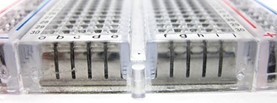
The leads can fit into the breadboard because the inside of a breadboard is made up of rows of tiny metal clips.
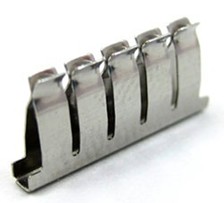
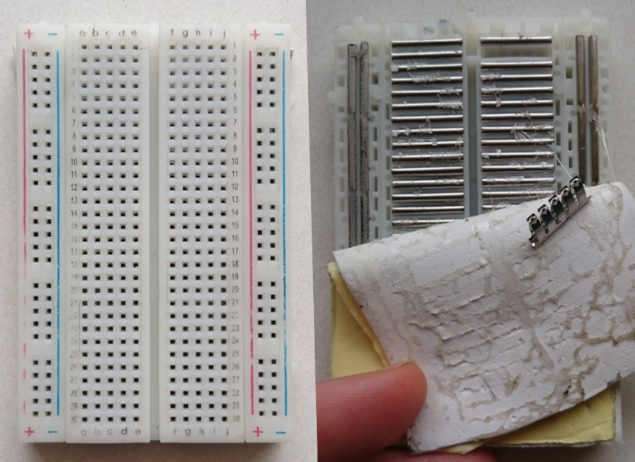
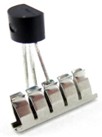
When you press a component's lead into a breadboard hole, one of these clips grabs onto it.
Some breadboards are made of transparent plastic, so you can see the clips inside.
Breadboard labels: rows, columns, and buses
What do the letters and numbers on a breadboard mean?
Most breadboards have some numbers, letters, and minus signs written on them. What does all that mean?
While their exact appearance might vary from breadboard to breadboard, the general purpose is always the same. These labels help you locate certain holes on the breadboard so you can follow directions when building a circuit. If you have ever used a spreadsheet program like Microsoft Excel or Google Sheets, the concept is the same. Row numbers and column letters help you identify individual holes in the breadboard, just like cells in a spreadsheet.
What do the colored lines and minus signs mean?
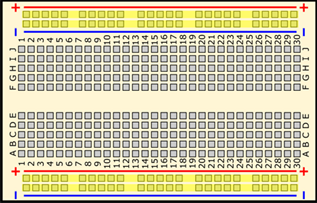
These strips are typically marked by red and blue (or red and black) lines, with plus (+) and minus (-) signs, respectively. They are called the buses (also referred to as rails) and are typically used to supply electrical power to your circuit when you connect them to a battery pack or other external power supply.
You may hear the buses referred to by different names:
- Power bus, positive bus, or voltage bus → next to the red line with the plus (+) sign.
- Negative bus or ground bus → next to the blue (or black) line with the minus (-) sign.
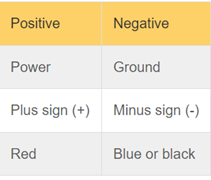
Sound confusing? Use this table to help you remember-
How are the holes connected?
The inside of the breadboard is made up of sets of five metal clips. This means that each set of five holes forming a half-row (columns A–E or columns F–J) is electrically connected.
For example:
- Hole A1 is electrically connected to holes B1, C1, D1, and E1.
- It is not connected to hole A2, because that hole is in a different row with a separate set of metal clips.
- It is not connected to holes F1, G1, H1, I1, or J1 because they are on the other half of the breadboard—the clips are not connected across the gap in the middle.
Unlike the main rows, which are connected in sets of five, the buses typically run the entire length of the breadboard (with some exceptions).
This image shows which holes are electrically connected in a typical half-sized breadboard, highlighted in yellow lines,
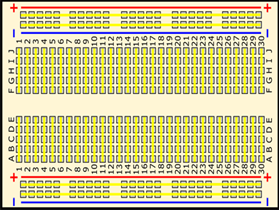
⚡ Buses on opposite sides of the breadboard are not connected. Typically, to make power and ground available on both sides, you would connect the buses with jumper wires.
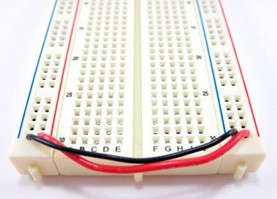
Using a breadboard
What is a breadboard diagram?
A breadboard diagram is a computer-generated drawing of a circuit on a breadboard. Unlike a circuit diagram or a schematic (which use symbols to represent electronic components), a breadboard diagram shows the actual layout of components on the board.
Common mistakes
Not pushing leads and wires in all the way
Electronic components and jumper wires can all have leads of varying lengths. Sometimes students will only push leads partially into a breadboard hole, instead of pushing them down firmly all the way (until they cannot go any farther).
Short circuits
Short circuits occur when "accidental" connections are made on a breadboard between two components that are not supposed to be connected. This can happen from putting components into the wrong rows or buses or letting exposed metal parts bump into each other.