CRO/DSO
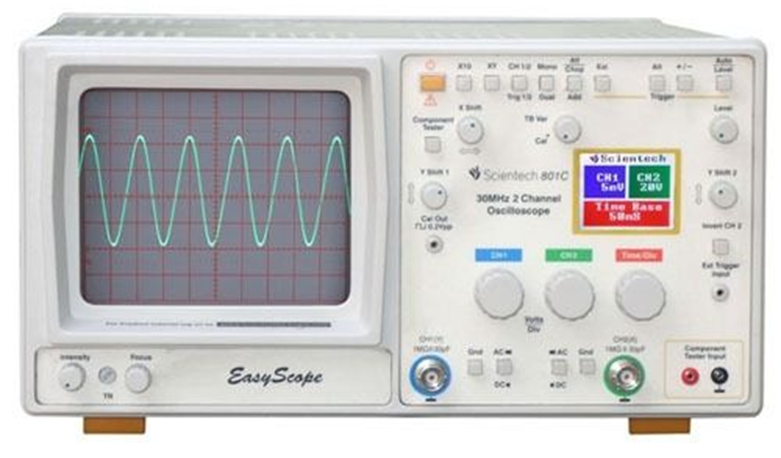
An oscilloscope is a test instrument which allows us to look at the shape of electrical signals by displaying a graph of voltage against time on its screen.
It is like a voltmeter with the valuable extra function of showing how the voltage varies with time.
A graticule with a 1cm grid enables us to take measurements of voltage and time from the screen.
Figure

Procedure
- Switch on the oscilloscope to warm up (it takes a minute or two).
- Do not connect the input lead at this stage.
- Set the AC/GND/DC switch (by the Y INPUT) to DC.
- Set the SWP/X-Y switch to SWP (sweep).
- Set Trigger Level to AUTO.
- Set Trigger Source to INT (internal, the y input).
- Set the Y AMPLIFIER to 5V/cm (a moderate value).
- Set the TIMEBASE to 10ms/cm (a moderate speed).
- Turn the timebase VARIABLE control to 1 or CAL.
- Adjust Y SHIFT (up/down) and X SHIFT (left/right) to give a trace across the middle of the screen.
- Adjust INTENSITY (brightness) and FOCUS to give a bright, sharp trace.
A calibration point is used to calibrate the CRO.
It gives a steady square wave at a particular set frequency and voltage.
The standard calibration signal is 0V–2V at 1 kHz.
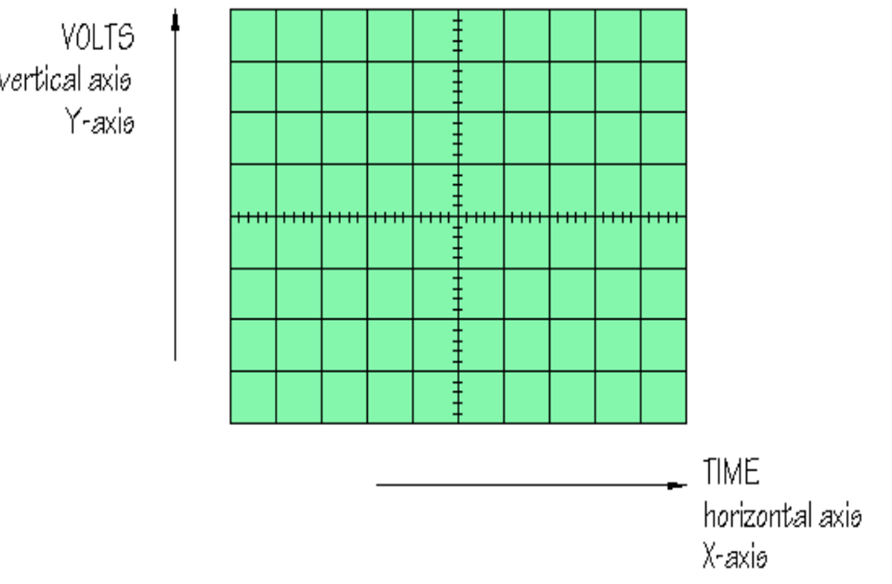
After connecting the oscilloscope to the circuit you wish to test, set the controls to obtain a clear and stable trace on the screen.
Most oscilloscopes have a BNC socket for the Y input and the lead is connected with a push and twist action.
Control Knobs
- Y AMPLIFIER (VOLTS/CM): Determines the height of the trace. Choose a setting so the trace occupies at least half the screen height, but does not disappear off the screen.
- TIMEBASE (TIME/CM): Determines the rate at which the dot sweeps across the screen. Choose a setting so the trace shows at least one cycle of the signal across the screen.
Note: A steady DC input signal gives a horizontal line trace for which the timebase setting is not critical.
- TRIGGER Control: Usually best left set to AUTO.
- AC/GND/DC Switch:
- Normal setting is DC for all signals (including AC signals).
- Switching to GND connects the y input to 0V to quickly check the position of 0V.
- Switching to AC inserts a capacitor in series with the input to block DC and pass only AC signals.
- Position Control: Controls horizontal position of trace on screen.
- DUAL BUTTON: Allows display of both channel signals on the screen at the same time (DUAL MODE).
Measurement of Peak-to-Peak Voltage and Peak Voltage
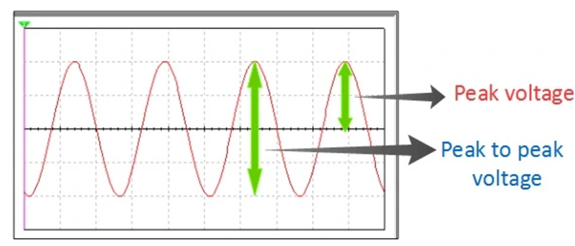
To measure the AC voltage of a sinusoidal waveform:
- Apply the input AC signal from the signal generator to a channel of CRO.
- Adjust the voltage/div switch (Y-plates) and time base switch (X-plates) such that a steady picture of the waveform is obtained.
- Measure the vertical height
L(peak-to-peak height). - Multiply this height
Lby the voltage/div sensitivityn.
$$ V_{pp} = L \times n = 2V_o $$
Measurement of Frequency
Using Time-Period
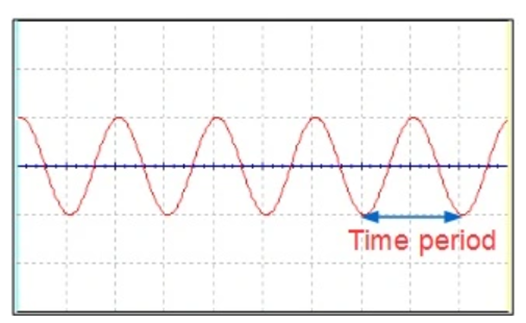
- From the trace, the time period of the input signal is equal to
t × (time/div setting). - Suppose the time period of the input signal is $T$.
- Then the frequency of the signal is:
$$ f = \frac{1}{T} $$
Digital Storage Oscilloscope
